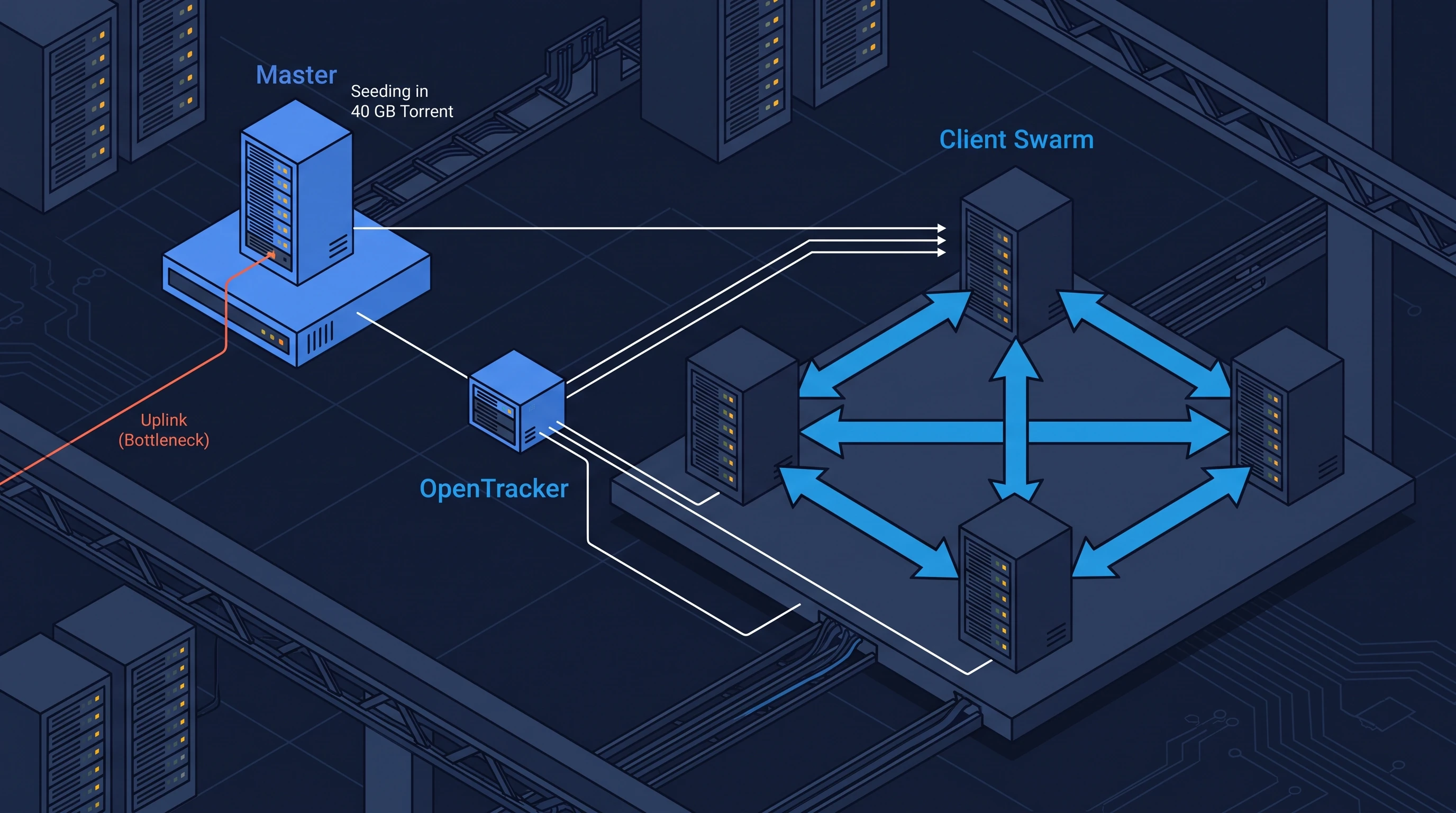
Big File Distribution With BitTorrent in a Private Cluster
/ 9 min read
Table of Contents
Overview
I had to deliver a 40 GB VM template to 20 servers at the same time over a
Gigabit network — a prebuilt base image, so every host can spin up an
identical VM from it. The catch: any classic method (scp, rsync, curl)
funnels the whole transfer through the master’s single NIC, which tops out at
125 MB/s, so the job takes about 2 hours no matter how you script it. The fix is a
private BitTorrent swarm: opentracker as the tracker, aria2c as the client on
every node, and Ansible to fire the whole swarm at the exact same second.
After you follow this guide, you will have a private P2P distribution pipeline where the master uploads exactly one copy of the file and every new client makes the network faster instead of slower.
Prerequisites
- Proxmox VE with 5 LXC containers (1 master + 4 clients,
node0..node4) on the same virtual switch (vmbr0), running Ubuntu - A 40 GB VM template file (
test_40gb.imgin my case) on the master opentracker,mktorrentandaria2on the nodes; Ansible on the control machine- An honest throttle: LXC containers on a Proxmox switch talk at 20-40 Gbps over RAM, which would ruin the experiment. I simulated a real Gigabit switch by capping every download/upload at 125 MB/s with aria2 limits
The Math: Why the Master Node Is the Bottleneck
A Gigabit NIC moves about 125 MB/s. That is the hard ceiling on the master’s single Ethernet port. From a 40 GB file (40,960 MB) and 20 target machines, two classic options:
- Sequential (one machine after another): the master focuses its full
125 MB/s on one target at a time.
40960 / 125 ≈ 5.5 minper machine, so20 × 5.5 = ~110 minutes. - Parallel (all 20 machines pulling at once via Ansible): the master splits
125 MB/s among 20 machines, i.e.
6.25 MB/seach. Total time:40960 / 6.25 = ~110 minutesagain.
Serial or parallel, a centralized architecture is capped by one NIC: ~2 hours.
Now the same problem through a BitTorrent lens: the moment a client downloads
anything, it starts uploading it to the other clients. Total upload capacity
becomes 1 (master) + 20 (clients) = 21 × 125 MB/s ≈ 2.6 GB/s. Every machine can
pull at its own full 125 MB/s, so the whole distribution finishes in the same
~5.5 minutes one machine took in the classic case — and adding more machines
does not slow it down, because each newcomer brings its own upload bandwidth.
There is a second, quieter win. With scp, the master pushes 800 GB total (40 GB × 20). In the swarm, the master uploads exactly one full copy (40 GB) — a share ratio of 1.0 — and the remaining 760 GB of traffic is generated by the clients helping each other. Master load drops by ~95%.
The Lab
My topology: node0 as the master, node1..node4 as clients, all LXC containers on the
same Proxmox virtual switch (vmbr0). The tooling stays deliberately small and Unix-y:
opentracker— a tiny C tracker, the switchboard that lets peers find each othermktorrent— CLI tool that chunks the file and produces the.torrentmetadataaria2c— lightweight multi-connection downloader, used for both seeding and leeching
Setting Up the Master Node (node0)
1. Start the tracker
systemctl restart opentrackerThis works, but I hit a wall with it later — more on that in the whitelist trap.
2. Chunk the file and mint the torrent (the -p flag matters)
mktorrent -p \ -a "http://192.168.1.75:6969/announce" \ -l 25 \ -o /root/test.torrent \ /root/test_40gb.imgThe -p (private) flag is what makes this safe for a corporate or homelab
network. Without it, clients would try DHT and Peer Exchange and start announcing
your torrent’s existence on the global internet — the last thing you want when
the payload is a company VM template. With -p, the torrent is stamped as
private and clients only talk to the tracker you specified. Closed-loop P2P
security starts here.
3. Start seeding
nohup aria2c --enable-dht=false \ --enable-peer-exchange=false \ --allow-overwrite=true \ --bt-seed-unverified=true \ --seed-ratio=0.0 \ --dir=/root \ /root/test.torrent > /tmp/aria2_seed.log 2>&1 &Two flags deserve attention:
--seed-ratio=0.0— by default aria2 stops seeding once it has uploaded as much as it owns (ratio 1.0). The master must keep seeding until the last client hits 100%, so we disable the limit.--bt-seed-unverified=true— the master already has the file; skip the full re-hash before seeding.
4. Ship the .torrent file to the clients
No nginx needed for a one-off:
cd /rootpython3 -m http.server 8080One line, and the clients can curl http://192.168.1.75:8080/test.torrent.
The whole point of the swarm is the 40 GB — the metadata is a few kilobytes.
The opentracker Whitelist Trap
The first time the clients announced to the tracker, the tracker answered
not connected and no peer ever saw another peer. The culprit: the Debian/Ubuntu
opentracker package runs in non-open mode by default — it only serves
torrents whose info hash is listed in /etc/opentracker/whitelist.conf
(access.whitelist). A brand-new torrent you minted yourself is, by default,
not on that list.
Fix: add the torrent’s info hash to the whitelist file and restart the service:
mktorrent -l 25 --hash-only /root/test_40gb.img # print the info hashecho "<info-hash>" >> /etc/opentracker/whitelist.confsystemctl restart opentrackerAfter that, announces started returning the full peer list and the swarm
actually formed. If you ever see healthy-looking aria2c logs with exactly one
connection that never grows, check this file before anything else.
Firing the Swarm With Ansible
For the swarm effect to work, every client must start downloading at the same
second. SSHing into 20 machines one by one would leave the first client alone
against the master while you type on the rest. So it’s Ansible’s turn: a
consume.yml playbook that installs the client, fetches the torrent, cleans up,
and fires the download.
That last step is where I made the mistake every sysadmin eventually makes. My cleanup task was:
- name: Kill existing aria2c instances shell: pkill -f aria2c || trueThe run turned bright red on every node:
fatal: [node1]: FAILED! => {"msg": "non-zero return code", "rc": -15}Signal 15, SIGTERM. pkill -f matches the full command line, and Ansible
runs each task through a temporary Python process whose arguments contain the
string “aria2c” — so the playbook killed itself. The fix is to match the process
name exactly instead: pkill -x aria2c.
The final playbook:
---- name: Deploy & Consume on Peer Clients  hosts: clients  gather_facts: no  tasks:    - name: Install aria2 on clients      apt:        name:          - aria2          - curl        state: present        update_cache: yes
    - name: Copy .torrent file to clients      shell: >        curl http://192.168.1.75:8080/test.torrent -o /root/test.torrent
    - name: Kill existing aria2c instances      shell: pkill -x aria2c || true
    - name: Trigger P2P Swarm Download (1 Gbps Throttled)      shell: >        nohup aria2c --enable-dht=false        --enable-peer-exchange=false        --summary-interval=2        --file-allocation=falloc        --max-overall-download-limit=125M        --max-overall-upload-limit=125M        --seed-ratio=0.0        --dir=/root/        /root/test.torrent > /tmp/aria2_download.log 2>&1 &      async: 10      poll: 0
The details that matter:
--max-overall-download-limit=125M/--max-overall-upload-limit=125M— the artificial Gigabit ceiling for the experiment.async: 10+poll: 0— fire-and-forget; Ansible does not wait for the download and moves on, which is exactly what simultaneous launch means.--seed-ratio=0.0— clients keep sharing after their own download finishes, until everyone is at 100%.
Then one command from the control machine:
ansible-playbook -i inventory.ini consume.ymlWithin seconds every client reads the torrent, announces to the tracker, discovers each other, and the data storm starts.
Why You Do Not Need to Assign Blocks Manually
A smart first reaction: “Let’s prevent the master bottleneck by dividing the work manually — machine 1 takes 0-10%, machine 2 takes 10-20%, and so on.” Static assignments like that create two failure modes: if the machine owning 10-20% dies, only the master has that block left, and everyone is back on the bottleneck; and a fast machine that finishes its slice sits idle, unable to help others.
BitTorrent solves both with two decentralized rules:
- Random first piece. At t=0 no client has anything. If everyone politely requested piece #1, the master would lock up. Instead, each client requests a completely random chunk first. With thousands of pieces and dozens of clients in the same second, collisions are near-zero — the “everyone pulls a different region” effect emerges on its own, with no central planner.
- Rarest piece first. After the first ~10-15 seconds, clients exchange bitmaps of what they own. From then on, every client prioritizes the piece that exists on the fewest machines in the swarm. If piece 890 exists on only one node, all the spare bandwidth floods toward replicating it.
The result is a homogeneous spread of all pieces across the swarm. If I had pulled the master’s plug halfway through the download, nothing would have happened — the clients already hold every piece and finish the job among themselves. That is the self-healing part.
The Results
On one client, tail -f /tmp/aria2_download.log told the whole story. The
connection count (CN) sat at CN:1 — master only — and jumped to CN:4/CN:5
the instant the tracker returned peer lists. The swarm was alive.
Because the Proxmox virtual switch is not a physical Gigabit switch, the clients peaked at ~240 MB/s between themselves. The full 40 GB landed on every node in 142 seconds (~2.5 minutes) — against the ~110 minutes the classic approach would have taken.
And the final line in the master’s log is the one this whole architecture is about:
[NOTICE] Your share ratio was 1.0, uploaded/downloaded=40GiB/40GiBFour clients needed 160 GB of data in total. The master uploaded 40 GB — one copy. The other 120 GB was produced by the clients helping each other, a 75% reduction of master load with just four clients. Scale that to 20 machines and the master still uploads exactly 40 GB: a 95% reduction. That is the difference between clients being a burden and clients being the source of the network’s power.
Takeaways
- Bottlenecks are a physical fact; you cannot delete a NIC’s frequency limit. What you can do is stop putting the bottleneck at the center.
- In a centralized design, every new client is load. In a private P2P design, every new client brings its own disk and uplink to the table.
- Keep the swarm private: the
-pflag onmktorrent, DHT and Peer Exchange off onaria2c, and a single internalopentracker. - The moving parts are tiny: a tracker, a metadata file, one downloader binary, and an Ansible playbook to start them simultaneously.
Next time a 50 GB model has to reach every GPU node, or a VM template has to fan out to every host before a capacity push, this is the pipeline I reach for.