Building and Pushing Docker Images to Harbor With a Self-Hosted GitHub Runner
/ 8 min read
Table of Contents
Overview
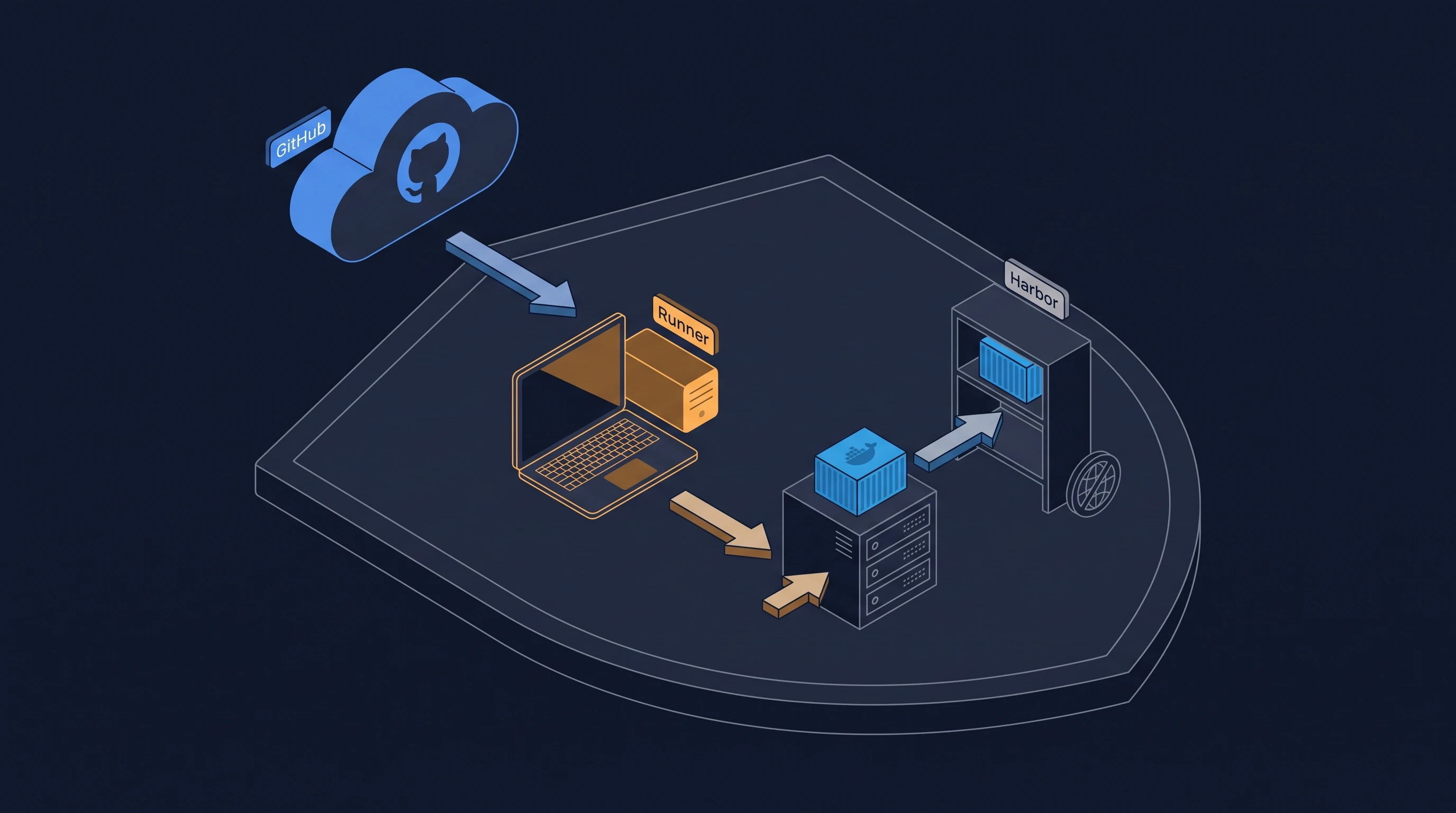
My application code lives on GitHub, while my container registry runs locally in my homelab as Harbor at harbor.burakberk.dev. The problem started when I wanted to automate container builds: GitHub-hosted runners run in Microsoft’s public cloud, which means they cannot reach a private IP address behind my home NAT. I had no desire to port-forward Harbor to the public internet, expose management interfaces, or maintain complex VPN tunnels just for CI workers to push images.
I solved this by inverting the network path: instead of letting GitHub reach into my network, I placed an ephemeral self-hosted GitHub Actions runner directly inside the homelab LAN. Because the runner polls GitHub over an outbound HTTPS connection, no inbound firewall ports are opened. Container builds run on my own hardware, Docker pushes to Harbor happen entirely over local Gigabit networking, and deployments trigger across the internal subnet via restricted SSH keys.
What follows is my notes on setting up the ephemeral runner with Docker Compose, configuring multi-service matrix builds with registry caching, and wiring up LAN-only continuous deployment.
Environment
My setup across the homelab infrastructure:
- Runner Host: Debian 12 virtual machine on Proxmox, running Docker Engine 26 and Docker Compose.
- Private Registry: Harbor v2.x running on the local subnet at
harbor.burakberk.dev. - DNS: Split-horizon DNS configured in AdGuard Home, so
harbor.burakberk.devresolves directly to the local LAN IP for internal nodes. - GitHub: Repository with Actions enabled, using repository secrets and a fine-grained Personal Access Token (PAT) for runner registration.
- Application Server: Target host (
192.168.1.20) running Docker Compose for deployments.
Harbor Setup & Scoped Robot Credentials
In my Harbor instance, I created a dedicated project named hosted. To keep CI credentials isolated, I avoided using an admin account and provisioned a project-scoped robot account (robot$github-runner) with push and pull privileges limited strictly to hosted.
If a CI workflow or a compromised dependency leaks this token, the blast radius is confined to that single project without write access to any other repositories or registry settings.
I stored the generated robot credentials in GitHub repository secrets:
HARBOR_USERNAME: The robot account name (robot$github-runner)HARBOR_PAT: The robot secret token
Ephemeral Runner Configuration
Static self-hosted runners tend to accumulate disk baggage: dangling images, stale build artifacts, and uncleared files from previous jobs. To keep jobs isolated and deterministic, I run the runner in --ephemeral mode.
In this setup:
- The container spins up and requests a short-lived registration token from GitHub’s API using the repository PAT.
- The runner registers under a unique hostname, accepts exactly one workflow job, and runs it to completion.
- Once the job finishes, the runner automatically deregisters itself from GitHub and terminates.
- Docker Compose’s
restart: alwayspolicy immediately boots a fresh container instance, repeating the cycle.
docker-compose.yaml:
services: github-runner: build: . restart: always # spins up a fresh runner instance whenever the previous container exits env_file: - .env volumes: - /var/run/docker.sock:/var/run/docker.sockMounting /var/run/docker.sock allows the runner job to invoke the host’s Docker daemon for building and pushing images directly.
Dockerfile:
FROM debian:12.15-slim
ENV DEBIAN_FRONTEND=noninteractiveENV RUNNER_ALLOW_RUNASROOT=1
RUN apt-get update && apt-get install -y --no-install-recommends \    curl ca-certificates jq build-essential libssl-dev libffi-dev \    git docker.io \    && rm -rf /var/lib/apt/lists/*
WORKDIR /actions-runner
# Download the latest runner packageRUN RUNNER_VERSION=$(curl -s https://api.github.com/repos/actions/runner/releases/latest | jq -r '.tag_name' | sed 's/v//') \    && curl -o actions-runner-linux-x64-${RUNNER_VERSION}.tar.gz -L https://github.com/actions/runner/releases/download/v${RUNNER_VERSION}/actions-runner-linux-x64-${RUNNER_VERSION}.tar.gz \    && tar xzf ./actions-runner-linux-x64-${RUNNER_VERSION}.tar.gz \    && rm actions-runner-linux-x64-${RUNNER_VERSION}.tar.gz \    && ./bin/installdependencies.sh
COPY entrypoint.sh /entrypoint.shRUN chmod +x /entrypoint.sh
ENTRYPOINT ["/entrypoint.sh"]entrypoint.sh:
#!/bin/bashset -e
# Unique name per running container to avoid registration collisionsRUNNER_NAME="${RUNNER_NAME_PREFIX:-ephemeral-runner}-$(hostname)"
echo "Fetching registration token..."REG_TOKEN=$(curl -sX POST -H "Authorization: token ${ACCESS_TOKEN}" \  -H "Accept: application/vnd.github.v3+json" \  https://api.github.com/repos/${REPO_OWNER}/${REPO_NAME}/actions/runners/registration-token | jq -r .token)
# --ephemeral ensures the runner processes one job and deregisters cleanly./config.sh --url https://github.com/${REPO_OWNER}/${REPO_NAME} \    --token ${REG_TOKEN} \    --name ${RUNNER_NAME} \    --ephemeral \    --unattended
# exec replaces the shell process so the container exits with run.shexec ./run.sh
.env (kept uncommitted):
ACCESS_TOKEN=ghp_...REPO_OWNER=burakberkkeskinREPO_NAME=myappRUNNER_NAME_PREFIX=homelabACCESS_TOKEN is a Personal Access Token with repository administration rights, used exclusively to exchange for the single-use registration token.
I brought the runner up with docker compose up -d. In the GitHub repository under Settings → Actions → Runners, the runner appears as homelab-<container-id> in an idle state ready for jobs.
The Workflow: Matrix Builds & Harbor Caching
When I first set up the pipeline, I included pull_request triggers alongside push. On a self-hosted runner, this is an immediate security hole: an untrusted fork opening a pull request can run arbitrary code directly on a machine sitting in your home network with access to Docker sockets and internal subnets. I dropped PR triggers from the self-hosted workflow and limited execution strictly to push events on main, release tags (v*.*.*), and manual workflow_dispatch.
.github/workflows/build-and-push.yml:
name: Build and Push to Harbor
on:  push:    branches: [ "main" ]    tags: [ "v*.*.*" ]  workflow_dispatch:
env:  REGISTRY: harbor.burakberk.dev  PROJECT: hosted
jobs:  build-and-push:    runs-on: self-hosted    strategy:      fail-fast: false      matrix:        include:          - service: backend            image_name: myapp-backend            context: ./backend            dockerfile: ./backend/Dockerfile            build_args: ""          - service: frontend            image_name: myapp-frontend            context: ./frontend            dockerfile: ./frontend/Dockerfile            build_args: |              VITE_API_URL=https://api.example.com
    steps:      - name: Checkout repository        uses: actions/checkout@v4
      - name: Set up Docker Buildx        uses: docker/setup-buildx-action@v4
      - name: Log in to Harbor        uses: docker/login-action@v4        with:          registry: ${{ env.REGISTRY }}          username: ${{ secrets.HARBOR_USERNAME }}          password: ${{ secrets.HARBOR_PAT }}
      - name: Extract Docker metadata        id: meta        uses: docker/metadata-action@v5        with:          images: ${{ env.REGISTRY }}/${{ env.PROJECT }}/${{ matrix.image_name }}          tags: |            type=raw,value=latest,enable=${{ github.ref == 'refs/heads/main' }}            type=ref,event=branch            type=semver,pattern={{version}}            type=sha,format=short
      - name: Build and Push Docker Image        uses: docker/build-push-action@v6        with:          context: ${{ matrix.context }}          file: ${{ matrix.dockerfile }}          build-args: ${{ matrix.build_args }}          push: true          tags: ${{ steps.meta.outputs.tags }}          labels: ${{ steps.meta.outputs.labels }}          cache-from: type=registry,ref=${{ env.REGISTRY }}/${{ env.PROJECT }}/${{ matrix.image_name }}:buildcache          cache-to: type=registry,ref=${{ env.REGISTRY }}/${{ env.PROJECT }}/${{ matrix.image_name }}:buildcache,mode=max
A few notes on this workflow design:
- Build Matrix: The
matrixstrategy builds multiple services (backendandfrontend) within one file, assigning specific Dockerfiles, contexts, and build arguments to each. - Tagging:
docker/metadata-actiongenerates short commit SHAs for every build, semver tags for git releases, and only produces thelatesttag when committing directly tomain. - Registry Cache: Because the runner container is ephemeral, any local Buildx layer cache inside the container is wiped when it restarts. GitHub Actions default cache (
gha) is not intended for local self-hosted setups. Instead, I store the cache directly in Harbor as an image (:buildcache) usingmode=max. Because Harbor lives on the local Gigabit LAN, layer cache pulls and pushes take 2–3 seconds.
Build Performance
The performance difference compared to public cloud runners was immediately apparent:
- Sub-Millisecond Latency: The runner machine and Harbor registry sit on the same physical Gigabit switch with ping times below 1ms (
<1ms). - NVMe Storage: Fast SSD/NVMe disk I/O prevents layer unpacking and local cache writes from choking the CPU.
- LAN-Speed Cache Hits: Buildx pulls and pushes multi-gigabyte
:buildcachelayers directly across the 1 Gbps local network without touching the internet uplink.
In practice, a full clean multi-service build and push that previously averaged around 4:00 minutes on GitHub-hosted public runners dropped to roughly 1:50 on this self-hosted runner—about a 55% reduction in total execution time. Most of that gain comes from pushing and fetching cache layers in 2–3 seconds over LAN rather than waiting on WAN bandwidth.
LAN-Only Continuous Deployment
Because the runner machine is already on the homelab network, deployment does not require webhooks or public ingress. Once the images land in Harbor, the workflow SSHs into the application server over the internal LAN and runs docker compose pull && docker compose up -d.
To handle authentication safely, I generated a dedicated ED25519 key pair with no passphrase:
ssh-keygen -t ed25519 -f deploy_key -N ""On the application host (192.168.1.20), I added the public key to /home/deploy/.ssh/authorized_keys. To prevent this key from ever launching an interactive shell or running arbitrary commands, I prefixed it with an SSH forced command:
command="cd /opt/apps/app && docker compose pull && docker compose up -d",no-port-forwarding,no-X11-forwarding,no-agent-forwarding ssh-ed25519 AAAAC3NzaC1lZDI1NTE5...I stored the private key in GitHub repository secrets as DEPLOY_KEY, then added the deployment step to the workflow job:
- name: Deploy to homelab server env: DEPLOY_KEY: ${{ secrets.DEPLOY_KEY }} run: | mkdir -p ~/.ssh printf '%s\n' "$DEPLOY_KEY" > ~/.ssh/deploy_key chmod 600 ~/.ssh/deploy_key ssh -i ~/.ssh/deploy_key \ -o StrictHostKeyChecking=accept-new \ deploy@192.168.1.20 \ "cd /opt/apps/app && docker compose pull && docker compose up -d"The SSH connection never leaves the local subnet; GitHub never receives a routable path to the destination host.
Security Boundaries
Running self-hosted CI agents on a private network introduces real risks if not bounded properly. In my setup, I enforce four constraints:
- No untrusted triggers: Only direct pushes and manual triggers run on this runner. If I need PR linting or testing on public forks, that runs on GitHub-hosted public runners without credentials.
- Project-scoped robot accounts: Harbor robot tokens only have read/write access to the
hostedproject, never the global registry. - Forced SSH commands: The deploy key cannot open a bash shell or read files;
sshdlocks execution strictly to pulling and starting the application containers. - Ephemeral container lifecycles: Every build runs in a clean runner instance and deregisters on exit, leaving behind no stale build artifacts or credentials.
Notes
With this architecture, every tag push creates and publishes versioned images to Harbor—such as harbor.burakberk.dev/hosted/myapp-backend:v1.2.0—without exposing any port on my router. Building across multiple CPU cores on bare metal is faster than GitHub’s free runners, layer caching over local NVMe storage is fast, and deployments complete over internal SSH in seconds.