Recovering Degraded Optical Media from 1997 to Immich
/ 10 min read
Table of Contents
Overview
Writable optical media produced between 1995 and 2012 are silently dying. Unlike stamped, pressed commercial discs made with metallic aluminum reflective layers, consumer recordable discs (CD-R, CD-RW, DVD-R, DVD+R) rely on photosensitive organic dyes that oxidize over time. When an optical drive encounters unreadable sectors on degraded media, standard operating system file copy utilities stall the kernel I/O queue and abort.
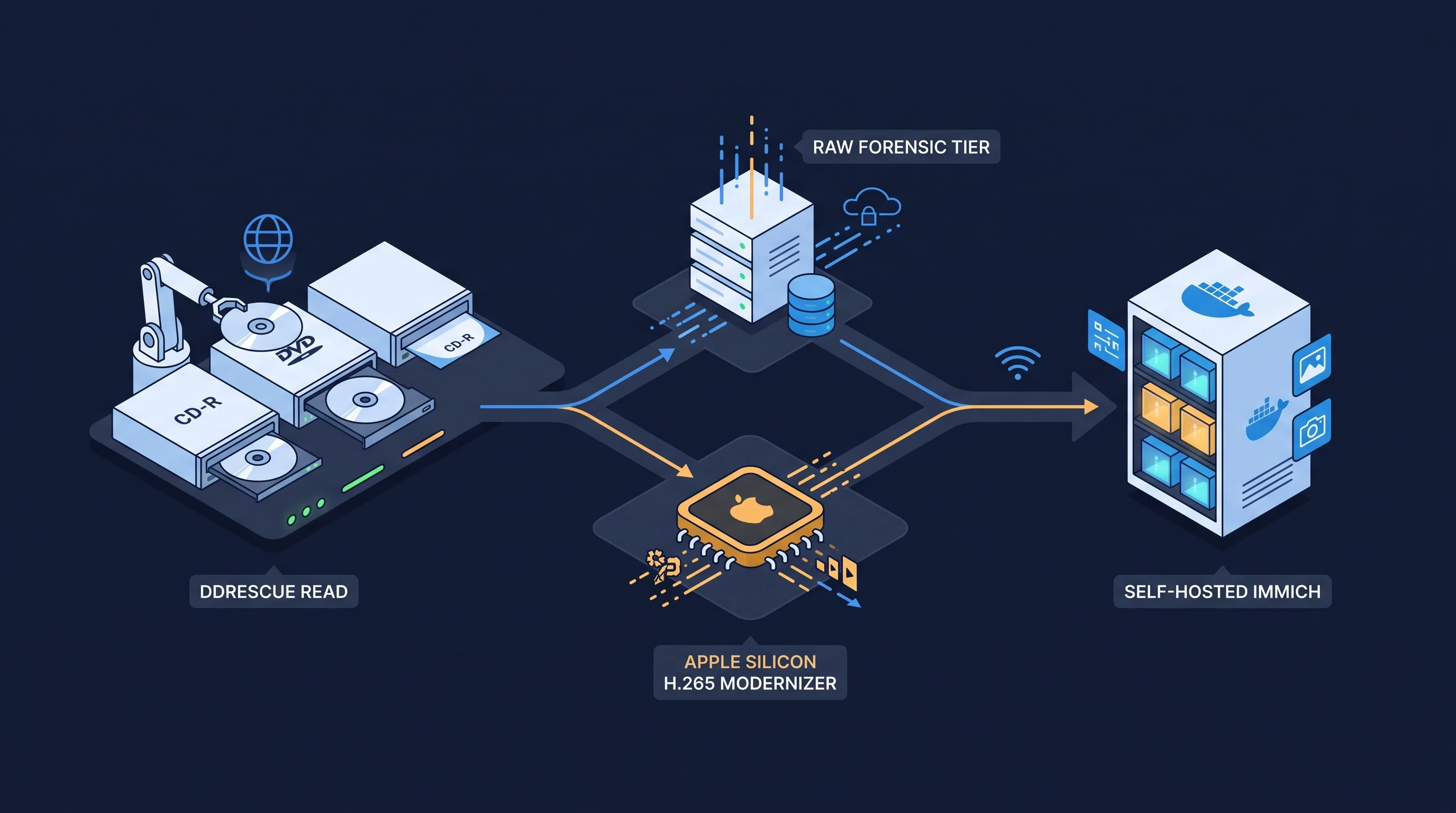
I recently completed a preservation project rescuing an uncurated collection of 48 physical optical discs and vintage backups spanning 1997 through 2012, holding family recordings and photos from my newborn days up to when I was ten years old. To recover the assets without losing damaged sectors or ballooning storage, I built an end-to-end dual-tier forensic recovery and modernization pipeline around GNU ddrescue, FFmpeg, and Immich.
What follows is my notes on the extraction hardware, the multi-phase imaging strategy, the modern access copy layer, and the timeline ingestion into Immich.
TL;DR
The complete preservation framework, automation scripts, and operational runbooks are open-sourced on GitHub:
I strongly recommend driving this recovery process through an AI agent harness (such as Claude Code, Codex, or Antigravity) rather than executing commands manually. Manually tracking 48 separate multi-pass imaging runs, inspecting SCSI Media IDs, and keeping spreadsheets updated across days of extraction is exhausting and error-prone.
Pairing an agent with the repository automates the entire bookkeeping lifecycle: querying drive diagnostics, identifying media manufacturers (Taiyo Yuden, Ritek, Mitsubishi), logging sector recovery percentages, recording physical labels, generating dedicated per-disc tracking plans (plans/DISC-XXX.md), and committing forensic checksums to Git. The failure mechanisms I encountered—from outer-ring dye delamination to DVD authoring burn-date overrides—are documented in AGENTS.md and role prompts (roles/) so the agent can triage discs, modernize codecs, and seal timestamps without human fatigue.
Environment
The hardware and software stack across the recovery workflow:
- Optical Extraction Node: Dedicated headless Linux machine equipped with a direct SATA optical drive (Pioneer/Optiarc), running GNU
ddrescue1.28 anddvd+rw-tools. - Modernization Workstation: Apple Silicon Mac (macOS) running FFmpeg 7 with
hevc_videotoolboxhardware encoding and Python 3.12. - Archive Storage: APFS local volume with hardlink support for zero-footprint photo deduplication.
- Target Platform: Self-hosted Immich instance on local infrastructure, ingested via
immich-go(v0.32+).
Dual-Tier Preservation Architecture
A common mistake in media preservation is converting raw data directly into modern formats and discarding the source, or conversely, storing raw ISOs that nobody can view on mobile devices.
To solve this, the pipeline enforces a strict physical two-tier separation:
┌─────────────────────────────────────────────────────────────┐│ Degraded Optical Media Disc │└──────────────────────────────┬──────────────────────────────┘ │ ddrescue (Direct SCSI Passthrough) │ ▼┌─────────────────────────────────────────────────────────────┐│ TIER 1: FORENSIC BIT-STREAM MASTER (Immutable) │├─────────────────────────────────────────────────────────────┤│ • Raw Disc Image: .iso / .bin ││ • Rescue Mapfile: .map (Sector status ledger) ││ • Integrity Hashes: SHA-256 / MD5 checksums ││ • Pristine Extracted Filesystem: Original VOB / DAT / AVI ││ • Strictly 100% Read-Only: Zero re-encoding │└──────────────────────────────┬──────────────────────────────┘ │ Pipeline Scripts / Modernizers │ ▼┌─────────────────────────────────────────────────────────────┐│ TIER 2: STREAM-READY ACCESS COPY │├─────────────────────────────────────────────────────────────┤│ • Video: H.265 (HEVC / hvc1) in MP4 container ││ • Deinterlacing: High-fidelity adaptive bwdif ││ • Streaming: +faststart moov atom header placement ││ • Audio: Resampled AAC-LC (192 kbps stereo) ││ • Photos: APFS hardlinked (Zero extra disk footprint) ││ • Timestamps: Sealed QuickTime container atoms & mtime/btime││ • Destination: Self-Hosted Immich Timeline / Apple Photos │└─────────────────────────────────────────────────────────────┘- Tier 1 (Forensic Master): Preserves bit-for-bit truth. If a newer neural upscaler or better deinterlacing algorithm is released a decade from now, the pristine source bits remain intact.
- Tier 2 (Modern Access Copy): Compressed, hardware-accelerated H.265 MP4 files with sealed historical capture timestamps ready for direct streaming on phones, tablets, and smart TVs.
Optical Hardware Station & Read Speed Pinning
Reading degraded discs requires bypassing operating system caching layers and managing drive thermal stress. Running an optical drive at default 48x or 52x speeds introduces severe centrifugal vibration and overheats the read laser when encountering bad sectors.
In my setup, I pinned the drive read speed down to 4x or 8x to stabilize the read buffer:
# Pin optical drive to 8x (or 4x for heavily scratched media)sudo hdparm -E 8 /dev/sr0
# Verify Media ID (MID) and disc structuredvd+rw-mediainfo /dev/sr0Multi-Phase Imaging with GNU ddrescue
Standard dd aborts on I/O errors. GNU ddrescue uses a sector mapfile algorithm that divides recovery into non-destructive copy, trimming, and scraping phases.
# Phase 1: Fast linear sweep copying readable sectors without retriesddrescue -b 2048 -d -v -n /dev/sr0 raw_discs/DISC-001.iso logs/DISC-001.map
# Phase 2: Reverse direction sweep (vital for edge-rot discs where outer tracks degrade first)ddrescue -b 2048 -d -v -R -n /dev/sr0 raw_discs/DISC-001.iso logs/DISC-001.map
# Phase 3: Targeted scraping pass on damaged blocks with 2 retriesddrescue -b 2048 -d -v -r 2 /dev/sr0 raw_discs/DISC-001.iso logs/DISC-001.map
Forensic Sector Patching
On one DVD+R (MCC 003 dye), the outer 1.2 GB suffered severe physical delamination. The optical drive could only extract the inner 2.8 GB. However, an incomplete partial file dump from a legacy hard drive backup existed from years earlier.
By utilizing ddrescue’s mapfile architecture, I patched the missing outer sectors into the master ISO without re-reading the damaged disc, verifying stream continuity across the VOB boundary and achieving 100% data recovery.
AI Agent-Driven Forensic Bookkeeping
Recovering 48 discs is as much an inventory and metadata tracking challenge as it is a hardware exercise. When running multi-pass imaging manually over several days, fatigue quickly leads to mistakes: forgetting which disc had unreadable lead-ins, failing to record dye manufacturers, or misplacing sector recovery numbers.
I offloaded this entire operational loop to an AI coding agent running inside the repository. For each physical disc loaded into the drive, the agent executed a strict triage routine:
- Hardware Diagnostics: Queried SCSI MMC data via
dvd+rw-mediainfoto record dye chemistry and manufacturer codes (e.g., Taiyo YudenTYG02, Mitsubishi ChemicalMCC 003, Princo). - Per-Disc Plan Generation: Created an individual tracking report (
plans/DISC-XXX.md) from a standardized checklist, documenting the physical label, estimated recording year, and sector budget. - Recovery Ledger & Status: Monitored
ddrescuemapfiles in real time, computed sector recovery percentages (e.g.,99.8%vs100.0%), and recorded outcomes (completed, partial, or blank) incatalogue/inventory.csv. - Integrity Hashes: Calculated SHA-256 and MD5 checksums of raw disc images and committed operational logs to Git.
Automating the bookkeeping through an agent ensured zero dropped discs, maintained an unbroken forensic chain of custody, and produced a clean, auditable catalog without hours of manual spreadsheet entry.
Modernizing Legacy Media to H.265
Raw extractions from early 2000s discs yield obsolete codecs:
- VCDs: MPEG-1 video streams packed in
.DATcontainers (AVSEQ01.DAT). - DVDs: Interlaced MPEG-2 split across multiple 1 GB
.VOBchunks. - Digital Cameras: Motion JPEG or DivX/XviD in
.AVIcontainers.
Deinterlacing and Aspect Ratio Normalization
Analog and early digital camcorders recorded in 480i or 576i interlaced formats. Playing raw interlaced video on modern progressive displays produces horizontal comb artifacts.
Furthermore, DVDs and VCDs use non-square pixels (SAR != 1). A PAL DVD stores 720x576, but is designed to be displayed at a 4:3 Display Aspect Ratio (768x576).
I wrote a modernization script around FFmpeg:
ffmpeg -y -v error -stats \ -i input.vob \ -vf "bwdif=mode=send_frame:parity=auto:deint=all,scale=768:576,setsar=1" \ -c:v hevc_videotoolbox -q:v 65 -tag:v hvc1 \ -c:a aac -b:a 192k \ -movflags +faststart \ output.mp4bwdif(Bob Weaver Deinterlacing Filter): Motion-adaptive deinterlacer that interpolates fields into full frames without blurring fine motion.-tag:v hvc1: Required for Apple hardware decoding. Withouthvc1, Safari and iOS Photos refuse hardware acceleration for HEVC streams and trigger server-side transcoding.-movflags +faststart: Relocates themoovatom (index header) to the beginning of the container, allowing streaming playback to start immediately over HTTP without downloading the full asset.
Zero-Footprint Photo Synchronization
For photo discs, copying thousands of high-resolution JPEGs would duplicate gigabytes of storage. Using APFS hardlinks (or Btrfs/XFS reflinks on Linux), I synchronized photos using shared inodes:
# Create an immutable pointer sharing identical disk inodesos.link(source_raw_photo, destination_export_photo)Across the collection, 7,500 photos were linked into the export tree consuming 0 bytes of additional disk space.
The DVD Authoring Trap: Recovering Capture Dates
When home videos were authored to DVD in the 2000s, authoring programs (e.g., Nero Burning ROM) stamped the DVD burn date (e.g., August 26, 2007) onto the filesystem for all generated VOB files. The true analog capture date (e.g., October 7, 2001) was wiped from filesystem metadata.
If imported directly into modern indexing engines like Immich or Apple Photos, every clip landed in 2007.
To fix this, I wrote a metadata sealing script:
python3 scripts/stamp_video_dates.py modernized_export/Trip_2001.mp4 "2001-10-07"The script performs a sub-second lossless remux:
- Embeds
creation_timeinside the MP4 container atom (-c copy -metadata creation_time="2001-10-07 12:00:00"). - Aligns filesystem modification (
mtime) and birth/creation (btime) timestamps usingtouch -tand macOSSetFile.
When ingested, photo indexing engines read the QuickTime container timestamp first, accurately placing the video onto the 2001 timeline.
Immich Timeline Ingestion
Once the modern tier was ready (8,105 assets, 35.3 GB), I ingested the library into my self-hosted Immich instance.
Preventing Redundant Server Transcoding
Immich’s default video transcoding policy (ffmpeg.transcode: required) checks uploaded video containers against an acceptedContainers list. In some versions, the default list is ["mov", "ogg", "webm"].
Because the modernized files were .mp4, Immich initially attempted to transcode all 626 videos, pegging the server CPU at 100%.
Adding mp4 to the accepted containers list via Immich’s System Configuration API prevented redundant re-encoding:
{ "ffmpeg": { "acceptedContainers": ["mp4", "mov", "ogg", "webm"], "acceptedVideoCodecs": ["hevc", "h264", "vp9", "av1"], "acceptedAudioCodecs": ["aac", "mp3", "opus"] }}Immich detected that the videos were already compliant H.265/AAC/MP4 and skipped transcoding entirely.
Ingestion via immich-go
Using immich-go (v0.32.0+, which provides native Immich v3 compatibility), I uploaded the collection without creating artificial folder albums:
immich-go upload from-folder \ --server="https://immich.example.com" \ --api-key="$IMMICH_API_KEY" \ --on-errors=continue \ --concurrent-tasks=5 \ --no-ui \ modernized_export/- Deduplication:
immich-gochecked asset checksums on the server against local files across the 48 discs, cleanly uploading unique assets without duplicating the library. - Result: All 8,105 photos and modernized videos populated their exact chronological positions from 1997 through 2012 on the main timeline.
Open-Source Toolkit & Automation Scripts
Writable optical discs are on borrowed time. Between organic dye breakdown and outer-ring delamination, leaving these 48 discs in storage for another few years would have resulted in permanent sector loss.
The pipeline scripts, repair routines, and SOP checklists used in this project are open source on GitHub:
burakberkkeskin/optical-disc-recovery
Repository Tooling:
modernize_videos.py: Batch interlaced VCD/AVI/MPG to H.265 MP4 modernizer with Apple Silicon acceleration.modernize_dvd.py: Multi-VOB concatenation and display aspect ratio normalizer.stamp_video_dates.py: Lossless QuickTime container creation time and filesystem timestamp sealer.link_photos.py: Zero-footprint photo hardlinker.audit_archive.py: SHA-256 deduplication and collection integrity auditor.inventory_template.csv&plans/TEMPLATE.md: Standardized cataloging sheets and recovery checklists.