Why I Migrated My Blog From Ghost CMS to Astro
/ 5 min read
Table of Contents
Overview
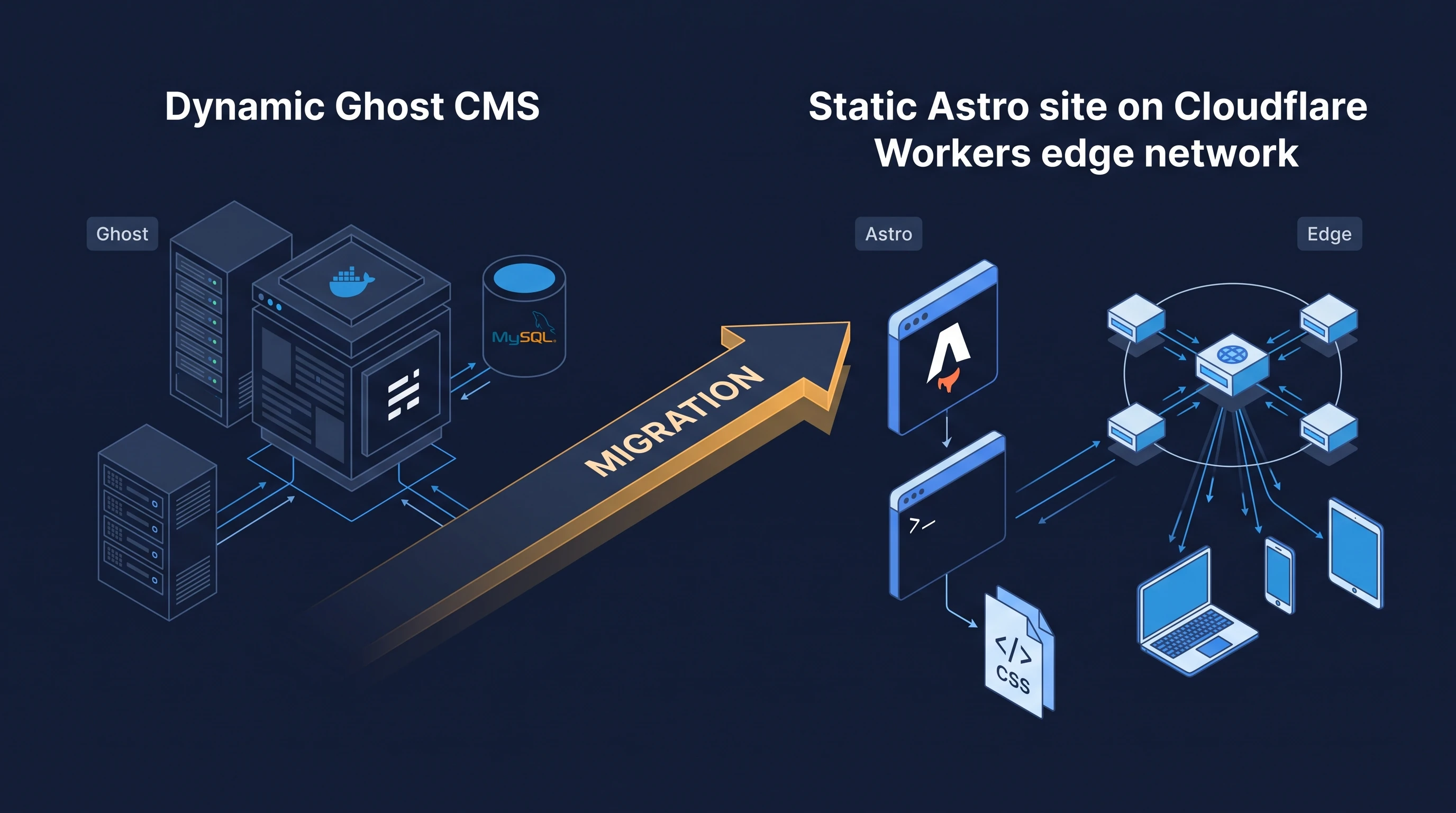
For a long time, I hosted my personal blog on Ghost CMS backed by a MySQL database and an Nginx reverse proxy running on a dedicated server. While Ghost has a clean web editor and built-in publishing tools, running a dynamic, database-backed application for what is essentially a collection of static technical notes created ongoing operational overhead, backup chores, and an unnecessary attack surface.
I recently migrated the entire blog to Astro and moved hosting to Cloudflare Workers with Static Assets. What follows is my notes on why I retired Ghost, how Git replaced my database backup routine, and how my current static edge pipeline works.
The Overhead of Ghost for a Tech Blog
Ghost is designed for modern publications: it includes user registration, member subscriptions, paid newsletters, email delivery integrations, and paywalls. For a personal engineering notebook, I needed none of these features.
Yet to support those capabilities, Ghost requires a full application stack:
- A persistent Node.js runtime process
- A relational database (MySQL 8.0)
- An Nginx reverse proxy terminating TLS and forwarding upstream requests
- Persistent storage volumes for uploaded media and themes
Running this stack meant dedicating at least one virtual machine or container to the blog 24/7. Even when receiving zero traffic, the Node process and MySQL daemon consumed memory and disk I/O. On smaller 1 GB RAM instances, running ghost update or rebuilding dependencies would occasionally exhaust available memory and trigger the Linux OOM killer unless large swap partitions were configured.
The 3-2-1 Backup Dilemma vs. Git
In Ghost, state was split across two distinct locations: structured post content and settings lived in MySQL tables, while uploaded screenshots and images lived on the filesystem under content/images.
Following standard backup hygiene (the 3-2-1 rule: 3 copies, 2 different media types, 1 offsite) required building and maintaining custom automation:
- Scheduled cron jobs running
mysqldumpto export SQL tables. - File-level synchronization jobs (using
rsyncorrclone) to copy uploaded images. - Scripted encryption of database dumps before transferring them to an offsite S3 or B2 bucket.
- Periodic manual restore tests to ensure that the database dump would actually import into a clean MySQL container without schema version mismatches.
If a database corruption or disk failure occurred, recovering meant provisioning a new MySQL instance, importing the dump, matching database credentials, and restoring media directories with the correct Linux permissions (chown -R ghost:ghost).
The Git Alternative
With Astro, content lives as plain Markdown files (content/posts/*.md) alongside image assets in a standard Git repository.
A 3-2-1 backup strategy happens naturally without writing a single backup script:
- Copy 1 (Local): The full working repository on my primary workstation.
- Copy 2 (Remote 1): The primary remote repository hosted on GitHub.
- Copy 3 (Remote 2 / Offsite): A secondary bare repository on a local NAS or secondary Git server, maintained with a simple remote push:
Terminal window git remote add backup git@nas.local:burak/blog.gitgit push backup main
Because Git stores the complete history of every file, I also get fine-grained versioning for free. Every edit, typo fix, and revision has a commit hash, author timestamp, and diff. If a file is accidentally deleted, git checkout restores it instantly.
Attack Surface and Security
A dynamic CMS exposes multiple interactive HTTP endpoints to the public internet:
- Administrative login forms (
/ghost/#/signin) - Member registration and session management APIs
- Webhook endpoints and dynamic search endpoints
Each endpoint requires protection against brute-force attacks, credential stuffing, SQL injection, and vulnerabilities in upstream npm dependencies. Running Ghost required ongoing maintenance: monitoring security advisories, patching the host OS, updating Node runtimes, and tuning fail2ban rules to block malicious login attempts.
A static Astro site compiles down to plain HTML, CSS, client-side assets, and pre-indexed search files (via Pagefind). At runtime:
- There is no database to inject.
- There are no authentication endpoints to attack.
- There is no server-side application runtime (no Node.js, PHP, or Python process) to exploit.
The attack surface drops to virtually zero because the server is not executing application code upon receiving an HTTP request.
Edge Performance & Cloudflare Workers
Serving a page in Ghost required an incoming request to travel from the user to the origin server, pass through Nginx, trigger a Node.js route handler, query MySQL, render the Handlebars template, and stream HTML back. Even with reverse-proxy caching in front of Ghost, cache invalidation and geographic latency to a single VPS remained bottlenecks.
With Astro, the entire site is pre-rendered at build time with npm run build:
dist/├── index.html├── posts/│ └── why-i-migrated-from-ghost-to-astro/│ └── index.html├── _astro/│ └── (hashed CSS, JS, and optimized WebP images)└── pagefind/I host this output on Cloudflare Workers using Static Assets. Instead of running a custom Worker script on every request, routing and caching are handled directly by Cloudflare’s Anycast edge network:
- Global Latency: Static assets are served from the nearest Cloudflare data center, resulting in sub-20ms Time to First Byte (TTFB) globally.
- Native Edge Headers: Security policies (HSTS Preload, Content Security Policy, frame options) are defined in
public/_headersand applied natively at the edge without Worker CPU consumption. - Native Redirects: Legacy URL mappings from Ghost paths are handled via
public/_redirectswith zero compute overhead. - Cost: The entire setup runs within Cloudflare’s free tier, eliminating the monthly cost of maintaining an always-on VPS for the blog.
Deployment Pipeline
Publishing a post no longer requires logging into a CMS web dashboard. The workflow is entirely Git-driven:
- I write the post in Markdown using my local editor.
- I verify the build locally:
Terminal window npm run checknpm run build - I tag the release following semantic versioning (
git tag v1.11.0). - On pushing the tag, GitHub Actions runs the build on Node.js 26 and deploys the
dist/directory to Cloudflare via Wrangler:- name: Deploy to Cloudflare Workersuses: cloudflare/wrangler-action@v4with:apiToken: ${{ secrets.CLOUDFLARE_API_TOKEN }}accountId: ${{ secrets.CLOUDFLARE_ACCOUNT_ID }}command: deploy
Notes
Migrating from Ghost to Astro shifted my blog from an infrastructure maintenance project back to what it should be: a lightweight, friction-free writing tool. I no longer monitor disk space, manage database snapshots, or patch CMS containers. The content is preserved in plain text, version-controlled in Git, and served globally from edge storage.