Streamline Coding with Free, Self-Hosted & Private Copilot
/ 2 min read
Table of Contents
Overview
Sending internal codebase context, proprietary tokens, and infrastructure definitions to commercial cloud AI APIs introduces data privacy and compliance concerns. Running localized code assistants directly on private hardware keeps source code strictly within the local area network while eliminating ongoing subscription fees.
In my homelab, I run an Ollama server on a dedicated host and connect my local VSCode environment to it using the open-source Continue extension. These notes cover configuring endpoint routing, tuning model parameters, and testing local generation latency.
Environment & Connectivity
Before configuring the client plugin, I verify reachability to the Ollama API port (11434) from the development machine:
curl http://192.168.1.100:11434# Ollama is runningIf Ollama is running locally on the same workstation:
curl http://127.0.0.1:11434# Ollama is runningConfiguring Continue.dev
After installing the Continue extension in VSCode, client configurations are stored in JSON format at:
- macOS / Linux:
~/.continue/config.json - Windows:
%userprofile%\.continue\config.json
I configured config.json to expose local quantizations (deepseek-coder and llama3.1) hosted on the LAN server:
{ "models": [ { "title": "Local DeepSeek-Coder 6.7B", "provider": "ollama", "model": "deepseek-coder:6.7b-instruct-q8_0", "apiBase": "http://192.168.1.100:11434" }, { "title": "Local Llama 3.1 8B", "provider": "ollama", "model": "llama3.1:8b-instruct-q8_0", "apiBase": "http://192.168.1.100:11434" } ], "tabAutocompleteModel": { "title": "StarCoder2 3B Autocomplete", "provider": "ollama", "model": "starcoder2:3b", "apiBase": "http://192.168.1.100:11434" }}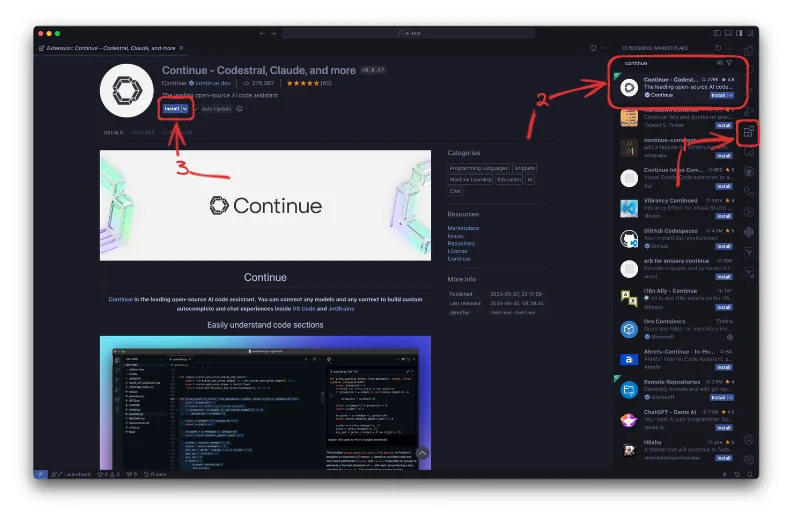
Validating Inference & Code Generation
Testing the connection inside VSCode verifies that the editor communicates cleanly with the upstream daemon:
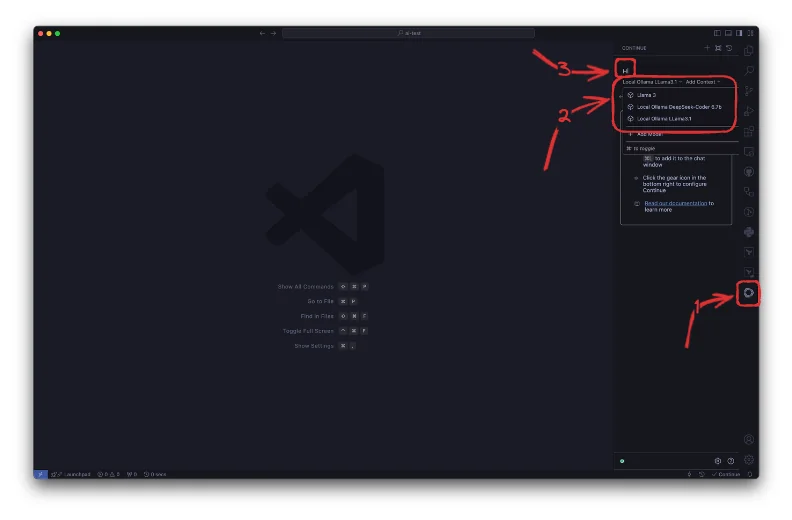
Pressing Cmd+I (Ctrl+I on Linux/Windows) triggers the inline code generation prompt. In local tests writing CLI utilities in Go without external dependencies, quantization q8_0 on a local GPU workstation delivered response times comparable to hosted services while maintaining complete data isolation.
Autocomplete vs. Chat Latency Trade-offs
Inline tab completion requires sub-100ms evaluation latency to avoid interrupting continuous typing flow. Running full 8B instruction models for background tab triggers introduces noticeable typing delay on consumer GPUs.
To preserve fluid editor ergonomics, I split model assignments in config.json:
- Inline Tab Completion: A lightweight 3B parameter model (
starcoder2:3borqwen2.5-coder:1.5b) bound totabAutocompleteModel. It consumes minimal VRAM and evaluates tokens in under 80ms. - Sidebar Chat & Refactoring: Quantized 7B/8B models (
deepseek-coder:6.7b-instruct-q8_0orllama3.1:8b) mapped undermodelsfor deliberate architectural questions, code reviews, and multi-file context prompts.